- Published on
Using Zeek to Analyze POP3 Protocol (2)
- Authors

- Name
- Morphy Chan
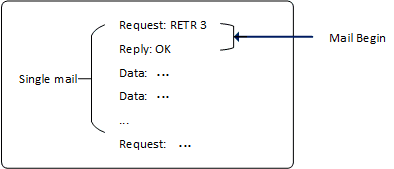
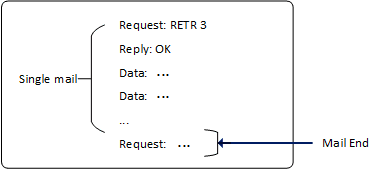
We know that the POP3 command for retrieving emails is RETR. Based on the Zeek API test results from Using Zeek to Analyze POP3 Protocol (1), we can outline a pattern for parsing email content:
- Email start markers:
- Client sends a
RETRcommand to request an email - Server responds with
OK
- Client sends a
- Email content: multi-line strings
- Email end marker: encountering a new command
Both start marker conditions must be met: RETR requests an email, and OK indicates a successful response. Before the next request command, we assume all multi-line strings in between are email content. Therefore, parsing emails essentially means tracking and analyzing this pattern line by line in the API's multi-line string output.
First, let's create a record Msg to store information for a single email:
type Msg: record {
    ts:                 time;
    uid:                string;
    id:                 conn_id;
    flag_retr_succ:     bool;       # Whether RETR request successfully retrieved email
    request:            string;     # Request command
    req_arg:            string;     # Request command argument
    reply:              string;     # Response
    retr_data_linenum:  int;        # Number of lines in email content
    retr_data:          vector of string;  # Stores email content
};
The flag_retr_succ field tracks whether both email start marker conditions are satisfied.
1. Detecting Email Start
Track the RETR command in pop3_request:
event  pop3_request(c: connection, is_orig: bool, command: string, arg: string)
{
    ...
    if(command == "RETR") {
        local retr_msg: Msg = [$ts = network_time(),
                                    $id = c$id,
                                    $uid = c$uid,
                                    $flag_retr_succ = F,
                                    $request = "RETR",
                                    $req_arg = arg,
                                    $reply = "",
                                    $retr_data_linenum = 0,
                                    $retr_data = vector()];
        g_retr_msg = retr_msg;
    }
  ...
}
When a RETR command is detected, a global Msg is initialized.
Correspondingly, check if the server responds with OK in pop3_reply:
event pop3_reply(c: connection, is_orig: bool, cmd: string, msg: string)
{
    ...
    if(cmd == "OK" && g_retr_msg?$flag_retr_succ) { # g_retr_msg exists
        if(g_retr_msg$request == "RETR" && g_retr_msg$reply == "") {
            g_retr_msg$flag_retr_succ = T;
            g_retr_msg$reply = "OK";
        }
    }
}
If we find:
- The reply command is
OK - The global msg records a
RETRrequest command,flag_retr_succis False, and reply is empty
This means the reply is responding to a RETR request, and the email was retrieved successfully. Both email start conditions are now satisfied:
2. Saving Email Content
Multi-line strings following the email start are treated as email content. We use pop3_data to save this content:
event  pop3_data(c: connection, is_orig: bool, data: string)
{
    if(g_retr_msg?$flag_retr_succ && g_retr_msg$flag_retr_succ == T) {
        if(g_retr_msg$retr_data_linenum < g_retr_msg_max_line) {
            g_retr_msg$retr_data += data;
            g_retr_msg$retr_data_linenum += 1;
        }
    }
}
When flag_retr_succ is True, the data content is email information — we save it to a string vector for line-by-line parsing later.
Detecting Email End and Parsing Content
We also use pop3_request to track email termination:
event pop3_reply(c: connection, is_orig: bool, cmd: string, msg: string)
{
    ...
    pop3_proc_g_retr_msg(); # Check email end marker and parse
    if(cmd == "OK" && g_retr_msg?$flag_retr_succ) { # g_retr_msg exists
        ...
    }
    ...
}
The pop3_proc_g_retr_msg function:
function pop3_proc_g_retr_msg()
{
    if(g_retr_msg?$flag_retr_succ && g_retr_msg$flag_retr_succ == T) {
        # Update POP3 info
        local rec: POP3::Info = [$ts = g_retr_msg$ts,
                                 $uid = g_retr_msg$uid,
                                 $id = g_retr_msg$id];
        g_pop3_rec = rec;
        ...

        # Parse email content
        for(idx in g_retr_msg$retr_data) {
            # print g_retr_msg$retr_data[idx];
            local data:string = g_retr_msg$retr_data[idx];
            local key: string = "";
            local val: string = "";
            local len: int;
            if(data != "") {
                # Match "to" field
                if(/^[tT][oO]:/ in data) {
                    key = "to";
                    val = data[3:];
                }
                else if(/^[fF][rR][oO][mM]:/ in data) {
                    key = "from";
                    val = data[6:];
                }
                ...
            }
            if(key != "" && val != "")
                pop3_update_g_rec_data(key, val);
        }
        # Write to POP3 log
        Log::write(POP3::LOG, g_pop3_rec);

        # Finished parsing one email, reinitialize global msg
        ...
    }
}
This function is called from pop3_request and checks if flag_retr_succ in the global msg is True. If so, it means a new command has been encountered — the email retrieval is complete:
After that, it parses the email content saved in the msg and updates the POP3 info record (following the pattern of Zeek's default SMTP parsing script, the POP3 script also creates a similar info record for writing parsed results to logs).
For parsing the saved email content strings, regex matching is used to extract key email fields like from, to, etc. — again following Zeek's SMTP parsing script approach.
3. Script Parsing Results
Here's the parsing result of the script on the test email:
$ cat pop3.log | jq
{
  "ts": 1615003258.432899,
  "uid": "CeJci2byiawb4zZlk",
  "id.orig_h": "192.168.153.18",
  "id.orig_p": 39118,
  "id.resp_h": "192.168.153.19",
  "id.resp_p": 110,
  "command": [
    "RETR",
    "OK"
  ],
  "arg": [
    "2"
  ],
  "date": " Fri, 5 Mar 2021 23:00:37 -0500",
  "from": "lisi <lisi@localdomain.com>",
  "to": [
    " zhangsan@localdomain.com"
  ],
  "msg_id": " <7ea7b5a3-3e76-ceee-2a49-a9ab81d5cc4c@localdomain.com>",
  "subject": " This is a test mail",
  "user_agent": " Mozilla/5.0 (X11; Linux x86_64; rv:78.0) Gecko/20100101"
}
Comparing this with the test email content from Using Zeek to Analyze POP3 Protocol (1), the script successfully extracts the relevant email fields. To parse additional fields, simply add more regex matching rules.
This script is based on a relatively rough pattern, and some edge cases may not be covered. There are also some open questions:
- Some email fields (like the User-Agent in the test email) span multiple lines — how should multi-line field values be handled?
- How should email attachments be parsed?