- Published on
Using Zeek to Analyze POP3 Protocol (1)
- Authors

- Name
- Morphy Chan
Zeek's core functionality is parsing various network protocols and writing the parsed content into log files. The current Zeek LTS 4.0.0 version does not provide a default POP3 protocol parsing script. This post discusses how to use Zeek to analyze POP3 protocol.
Although Zeek doesn't provide a default POP3 script, it does offer POP3 parsing APIs 1, mainly:
pop3_request: parses client request commands sent to the serverpop3_reply: parses server response commandspop3_data: parses the data content in server responses
Let's first examine the parsing results of these APIs. Here's a script that prints the request and reply parameters:
event  pop3_request(c: connection, is_orig: bool, command: string, arg: string)
{
    print fmt("request: cmd: %s, arg: %s", command, arg);
}

event pop3_reply(c: connection, is_orig: bool, cmd: string, msg: string)
{
    print fmt("reply: cmd: %s, msg: %s", cmd, msg);
}
Using this script to parse a pcap file containing a POP3 test email:
$ zeek -Cr pop3.pcap ../../script/pop3/
The output:
reply: cmd: OK, msg: Dovecot ready.
request: cmd: CAPA, arg:
reply: cmd: OK, msg:
request: cmd: AUTH, arg: PLAIN
reply: cmd: OK, msg: Logged in.
request: cmd: STAT, arg:
reply: cmd: OK, msg: 2 1242
request: cmd: LIST, arg:
reply: cmd: OK, msg: 2 messages:
request: cmd: UIDL, arg:
reply: cmd: OK, msg:
request: cmd: RETR, arg: 2
reply: cmd: OK, msg: 760 octets
request: cmd: QUIT, arg:
reply: cmd: OK, msg: Logging out.
We can see that pop3_request and pop3_reply parse POP3 request and response commands chronologically. A few notable pairs:
request: cmd: LIST, arg: reply: cmd: OK, msg: 2 messages:
- Requests listing of user's emails; the response indicates 2 emails exist.
request: cmd: RETR, arg: 2 reply: cmd: OK, msg: 760 octets
- Requests the 2nd email; the response confirms success with 760 bytes of data.
pop3_request and pop3_reply parse POP3 commands. Next, let's test the email content parsing by adding a pop3_data handler to the script:
event  pop3_data(c: connection, is_orig: bool, data: string)
{
    print fmt("data: %s",data);
}
Parsing result:
...

request: cmd: RETR, arg: 2
reply: cmd: OK, msg: 760 octets
data: Return-Path: <lisi@localdomain.com>
data: X-Original-To: zhangsan@localdomain.com
data: Delivered-To: zhangsan@localdomain.com
data: Received: from [192.168.153.18] (unknown [192.168.153.18])
data: by localhost.localdomain.com (Postfix) with ESMTP id 3B96EA37B5
data: for <zhangsan@localdomain.com>; Fri, 5 Mar 2021 23:00:46 -0500 (EST)
data: To: zhangsan@localdomain.com
data: From: lisi <lisi@localdomain.com>
data: Subject: This is a test mail
data: Message-ID: <7ea7b5a3-3e76-ceee-2a49-a9ab81d5cc4c@localdomain.com>
data: Date: Fri, 5 Mar 2021 23:00:37 -0500
data: User-Agent: Mozilla/5.0 (X11; Linux x86_64; rv:78.0) Gecko/20100101
data: Thunderbird/78.7.1
data: MIME-Version: 1.0
data: Content-Type: text/plain; charset=utf-8; format=flowed
data: Content-Transfer-Encoding: 7bit
data: Content-Language: en-US
data:
data: Hello zhangsan
data:
request: cmd: QUIT, arg:
reply: cmd: OK, msg: Logging out.
As we can see, pop3_data parses the complete email content as multi-line strings, including all header fields and the body.
Combining the results of all three APIs, Zeek's POP3 parsing output follows a chronological, multi-line string format, as illustrated below:
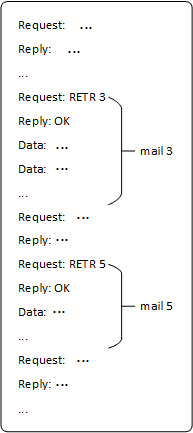
Figure 1: Zeek API parsing POP3
Therefore, developing a POP3 parsing script essentially means analyzing email content patterns within these multi-line strings produced by the APIs, and extracting the relevant email fields accordingly.